Hyperliquid Review 2026: Complete Beginner's Guide
Who this guide is for: Anyone curious about trading cryptocurrencies, commodities, or indices on a fully onchain exchange.


Hyperliquid Review 2026: Complete Beginner's Guide
Who this guide is for: Anyone curious about trading cryptocurrencies, commodities, or indices on a fully onchain exchange. Whether you have never touched DeFi (decentralised finance, meaning financial tools that run on a blockchain without a company holding your money) or you are switching from a centralised exchange like Binance or Coinbase, this guide walks you through everything step by step.
We tested this on three real devices (screenshots throughout are taken live, not stock photos):
- Desktop – 1440px wide screen (Windows laptop or iMac)
- Tablet – iPad at 1024px
- Phone – iPhone 16 Pro Max at 430px
What Is Hyperliquid? (Plain English)
Imagine a stock exchange, but instead of a company running the servers in a private data centre, every order, trade, and balance lives on a public blockchain (a shared digital ledger that nobody owns and anyone can inspect). That is Hyperliquid in a nutshell.
More specifically, Hyperliquid is a decentralised exchange (DEX) that specialises in:
- Perpetual contracts (also called "perps"): These are agreements to buy or sell an asset at a future price. Unlike a normal futures contract, they never expire, so you can hold the position as long as you want, paying or receiving a small "funding fee" every few hours to keep the price anchored to reality. Think of it like a bet on where a price is heading, with the option to use leverage (borrowed money to multiply both gains and losses).
- Spot trading: Buying and selling actual tokens directly, not contracts.
Everything runs fully onchain, which means Hyperliquid never holds your funds in a company bank account. You keep control of your assets through your own crypto wallet at all times.
In plain terms: Hyperliquid is a self-service trading platform where you stay in control of your money while accessing more than 300 markets including crypto coins, commodities, and indices, all running 24 hours a day, 7 days a week.
Who built it? Hyperliquid was built by a team focused on bringing the speed and depth of a centralised exchange orderbook (the live list of every buy and sell order) to a fully decentralised, onchain environment. The project runs on its own purpose-built blockchain layer, and its native token is called HYPE. Beyond that, the founding team has kept a relatively low profile, and detailed biographical information is not publicly available in official documentation at the time of writing.
Key facts (October 20, 2026):
- Live markets: 300+ perpetual and spot markets
- HYPE token mark price: $77.394
- HYPE 24h trading volume: $219,598,411.32
- HYPE open interest (total value of all open leveraged positions): $1,539,221,578.54
- HYPE funding rate: 0.0013% per funding period
- Maker fee (fee paid when you add an order to the book): 0.0150%
- Taker fee (fee paid when you fill an existing order immediately): 0.0450%
- Custody model: Non-custodial, meaning you control your own funds
- Access restrictions: Certain jurisdictions including sanctioned regions are blocked
- Collateral options: USDC, USDT, HYPE, and BTC supported
- New features as of review date: Trailing stop orders on perp markets, and manual borrowing using HYPE and BTC as collateral to borrow USDC or USDT
How Hyperliquid Looks on Your Device
We opened Hyperliquid on three different screen sizes and took real screenshots so you know exactly what to expect before you visit.
On a Laptop or Desktop Computer (1440px wide)
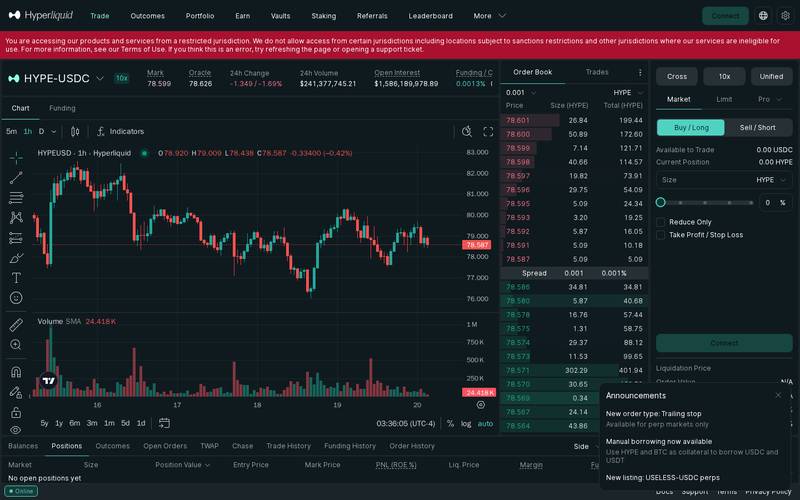
The full trading dashboard on a wide screen, showing the price chart, order book, and order entry panel all at once.
Best for: Active traders who want to see the chart, order book (the live list of buy and sell orders), and their positions simultaneously without switching tabs. The wide layout lets you monitor multiple data points at a glance.
On a Tablet (iPad, 1024px wide)
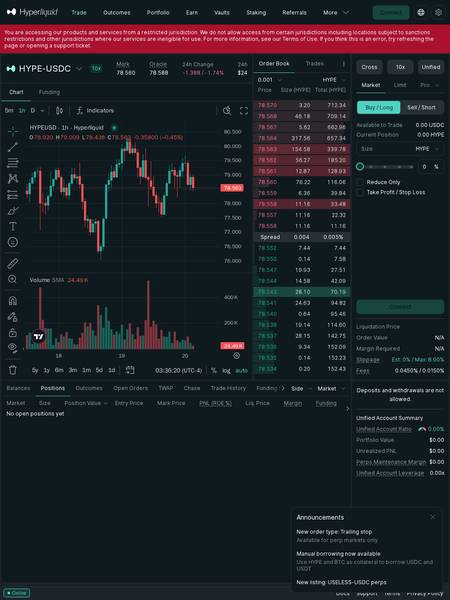
The tablet view compresses the layout slightly but keeps the core trading panels accessible.
Best for: Casual monitoring and occasional order placement. You can see the chart and order entry panel comfortably, though the order book may feel a little cramped compared to a full desktop screen.
On a Phone (iPhone 16 Pro Max, 430px wide)
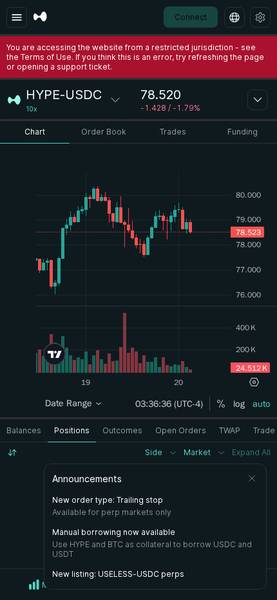
The mobile view stacks panels vertically. You scroll down to move from the chart to the order form.
Best for: Checking positions and closing trades on the go. Opening complex new leveraged positions on a small screen requires care, so take your time and double-check your inputs.
Bottom line on devices: Hyperliquid works on all three screen sizes. Serious traders will prefer the desktop experience for its information density. Mobile is fine for monitoring and quick order management, but beginners should place their first trades on a larger screen where they can read every field clearly.
Core Features
Hyperliquid packs a significant number of features into a single onchain platform. Here is what matters most for new users:
300+ Markets Around the Clock
Hyperliquid lists over 300 perpetual and spot markets covering cryptocurrencies, commodities, and indices. These markets are open 24 hours a day, 7 days a week, unlike traditional stock markets that close on weekends.
Fully Onchain Orderbook
Most DEXes use an automated pricing formula (called an AMM, or automated market maker). Hyperliquid instead runs a full central limit orderbook (CLOB) onchain. This means you see real bid and ask prices with real sizes, just like a professional trading terminal, but without a company controlling the backend.
Leverage Up to 10x (and Higher on Some Markets)
On the HYPE-USDC perpetual market, for example, you can trade with up to 10x leverage. This means with $100 of your own money you can open a $1,000 position. This multiplies both profits and losses, so beginners should start with 1x or no leverage at all until they understand how liquidation (the forced closure of your position if losses reach a threshold) works.
Unified Account with Borrowing
Hyperliquid uses a unified account model. Your HYPE and BTC holdings can serve as collateral to borrow USDC or USDT (two stablecoins, meaning tokens pegged to the US dollar). This is a relatively advanced feature best approached after you are comfortable with basic trading.
Order Types
- Market order: Executes immediately at the current best available price
- Limit order: You set a target price and the order waits until the market reaches it
- Pro order types: Available for advanced users
- Trailing stop (new): Automatically moves your stop-loss price as the market moves in your favour, locking in profits if the price reverses
Transparent Fees
Fees are shown clearly in the order panel before you confirm any trade. Taker fee is 0.0450% and maker fee is 0.0150%. On a $1,000 trade, that is $0.45 as a taker or $0.15 as a maker.
Funding Rates
In perpetual markets, a funding rate (a small periodic payment between buyers and sellers) keeps the contract price close to the real spot price. When the rate is positive (as it was at 0.0013% at the time of our check), long position holders (those betting the price goes up) pay short holders. This resets every few hours.
Non-Custodial
At no point does Hyperliquid hold your private key (the master password to your wallet). You approve every transaction from your own wallet.
Fee Schedule
Hyperliquid charges trading fees based on whether you are a maker or a taker:
- Taker: You place an order that fills immediately against an existing order in the book. You are "taking" liquidity.
- Maker: You place an order that sits in the book waiting to be filled by someone else. You are "making" liquidity.
Makers pay lower fees because they help the exchange by providing orders for others to trade against.
| Fee Type | Rate | Example on $1,000 Trade |
|---|---|---|
| Taker fee | 0.0450% | $0.45 |
| Maker fee | 0.0150% | $0.15 |
| Deposit fee | N/A (check docs) | N/A (check docs) |
| Withdrawal fee | N/A (check docs) | N/A (check docs) |
| Funding rate (HYPE perp) | 0.0013% per period | Varies by position size and direction |
Note: The funding rate shown (0.0013%) is the live rate captured during testing and changes continuously. Always check the funding panel before opening a leveraged position.
Slippage (the difference between the price you expect and the price you actually get) defaults to a maximum of 8.00% on market orders. You can adjust this. Estimated slippage at normal market conditions is shown as approximately 0% for liquid markets like HYPE.
Step-by-Step Tutorial
This tutorial walks you through placing your first perpetual trade on Hyperliquid. Because Hyperliquid is a perpetuals and spot exchange, not a simple token swapper, the steps below are specific to opening a leveraged perpetual position.
Step 1: Open Hyperliquid and Connect Your Wallet
Go to https://app.hyperliquid.xyz and click the "Connect" button (usually top-right corner).
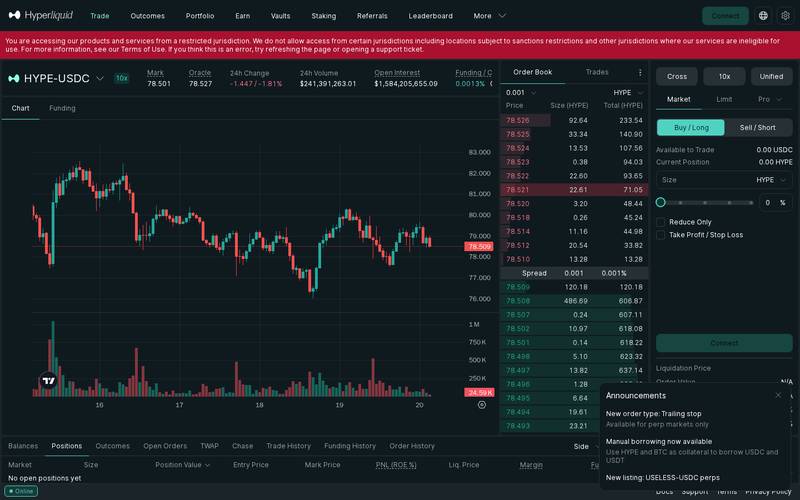
Choose your wallet from the list. MetaMask, WalletConnect, Coinbase Wallet, and others are supported.
Important note for new users: If you are in a restricted jurisdiction (including countries under international sanctions), Hyperliquid will display a message saying access is not permitted. Check the Terms of Use on the site for the current list. If you see this message unexpectedly, try refreshing, or open a support ticket via the Support link in the footer.
Before connecting, make sure you have a crypto wallet installed and funded. If you are brand new, MetaMask (browser extension, available at metamask.io) is a common starting point. You will need some crypto already in your wallet to deposit as margin (the security deposit that covers potential losses on leveraged trades).
Step 2: Deposit Funds into Your Hyperliquid Account
After connecting your wallet, you need to deposit funds into your Hyperliquid trading account. This is different from just connecting your wallet: the deposit moves tokens from your external wallet into your onchain Hyperliquid account so they can be used as margin.
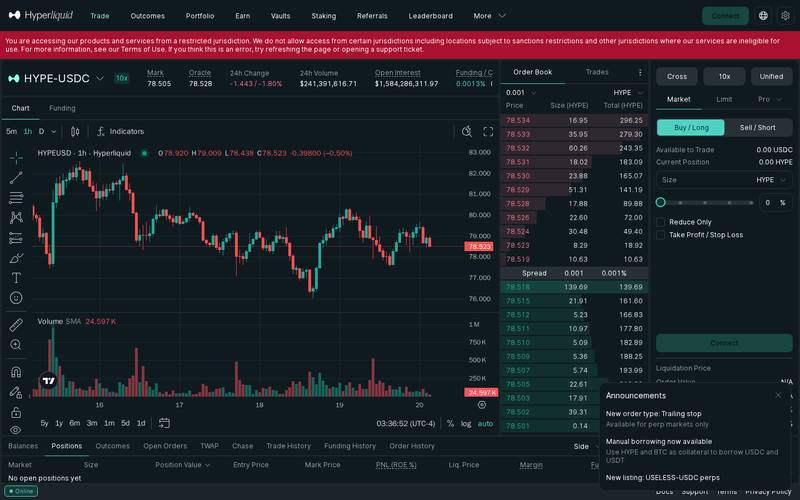
Look for the "Deposit" option in the account or balances panel (shown at the bottom of the trading screen). Hyperliquid accepts USDC and USDT as primary collateral for perpetual trading. You can also use HYPE and BTC as collateral under the borrowing feature.
Steps to deposit:
- Click "Deposit" in the Balances tab
- Enter the amount of USDC or USDT you want to move into the platform
- Confirm the transaction in your wallet
Once confirmed, your "Available to Trade" balance (shown in the order panel as "0.00 USDC" when empty) will update to reflect your deposit. Only trade with money you can afford to lose entirely.
Step 3: Select a Market and Set Up Your Trade
Now you are ready to place a trade. The trading interface shows the market ticker at the top. By default you may see HYPE-USDC. To change markets, click the market name and browse the full list of 300+ available perpetual and spot markets.
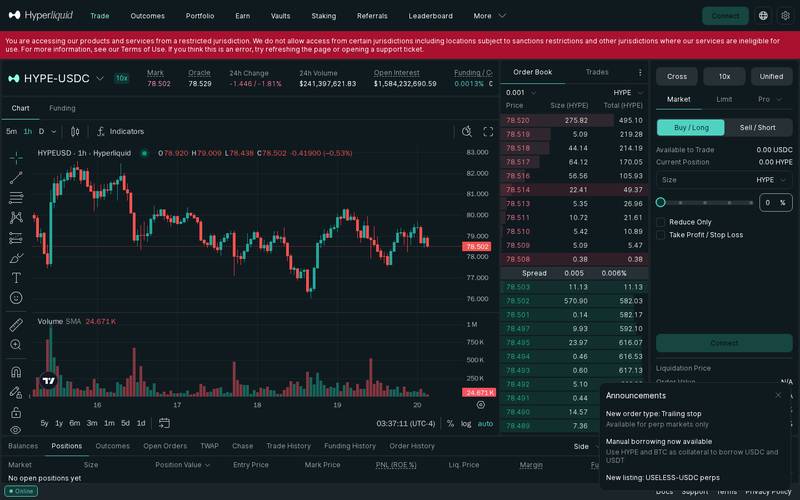
Once you have chosen a market, look at the order entry panel on the right side of the screen:
- Choose your order type: Market (fills immediately), Limit (fills at your target price), or Pro (advanced options)
- Choose your direction: Buy / Long (you profit if price rises) or Sell / Short (you profit if price falls)
- Enter your position size in the asset (for example, a number of HYPE tokens)
- Optionally set a Take Profit price (auto-closes your position in profit) or Stop Loss price (auto-closes your position to limit losses)
- Review the leverage multiplier shown near the market name (for example, 10x on HYPE-USDC)
Key fields to check before confirming:
| Field | What It Means |
|---|---|
| Mark Price | The current fair-value price used to calculate your unrealised profit or loss |
| Liquidation Price | If the market reaches this price, your position is automatically closed and you lose your margin. This is the most important number for risk management |
| Order Value | The total notional value of your position, including leverage |
| Margin Required | The actual amount of your own money locked as collateral for this trade |
| Fees | The taker or maker fee that will be charged on this trade |
| Funding Rate | The ongoing periodic cost or income for holding this position overnight or longer |
Step 4: Use a Trailing Stop for Better Risk Management (Optional)
Hyperliquid recently added trailing stop orders for perpetual markets. A trailing stop is a stop-loss that automatically moves in your favour as the price moves in your favour, but locks in place if the price moves against you.
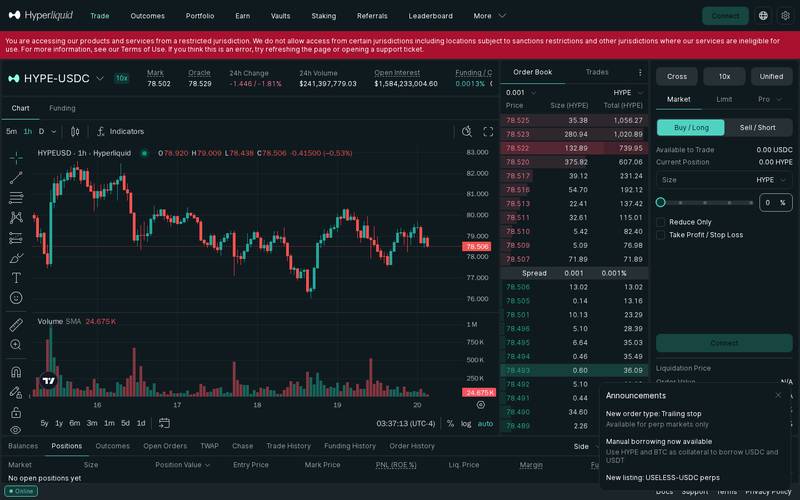
Example: You buy HYPE at $77. You set a trailing stop with a $3 trail. If HYPE rises to $85, your stop automatically moves up to $82. If the price then falls to $82, the position closes and you lock in a $5 gain per token rather than watching it fall back to $77.
To use a trailing stop:
- Open a position as described in Step 3
- After the position is open, navigate to your open positions in the Positions tab
- Look for the trailing stop option in the position management panel
- Enter your desired trail distance in dollars or percentage
- Confirm the order
This feature is only available on perp markets, not spot markets.
How to Use a Referral Link
What Is a Referral Link?
A referral link is a special web address that has a unique code attached to it. When you use that link to visit Hyperliquid and then trade, the platform knows who sent you. The person who shared the link (the referrer) may earn a share of the fees your trades generate, and sometimes you as the new user receive a discount too.
Think of it like a tip jar: When you buy a coffee at a new cafe because your friend recommended it, they do not get a cut of your bill. But in DeFi referral systems, the platform is designed to automatically reward the person who brought you in, without any extra cost to you (the fee is taken from the platform's own revenue share, not added on top of your fee).
How to Use Someone Else's Referral Link
When someone shares a referral link with you, here is what happens step by step:
Step 1: Open the link
Click the link your friend or influencer shared. It will open Hyperliquid with a special code in the URL that tells the platform who referred you.
On desktop:

On mobile:

Step 2: Connect your wallet
Connect exactly as described in the tutorial above.
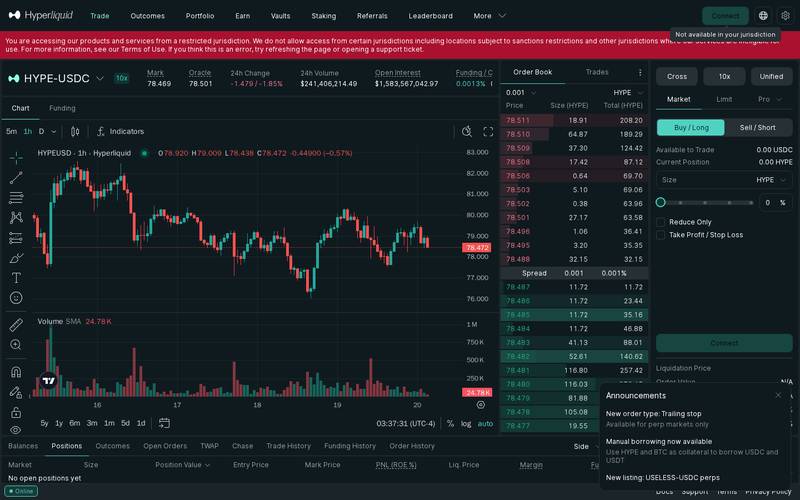

Step 3: Review the trade
The referral code is usually applied automatically when you open the link. You do not need to enter a code manually in most cases. Before placing any trade, confirm in the platform interface whether a referral discount applies to your account. Check the fee display in the order panel to see your current taker and maker rates.
Step 4: The Optional Tip
Some referral systems include an option to send an additional voluntary tip to the referrer. This is entirely optional and separate from your trading fees. If you see such an option, read it carefully before enabling it.
Step 5: Confirm in Your Wallet
After reviewing everything, click the confirm button. Your wallet shows a final confirmation with the exact amounts and the network gas fee (the small fee paid to the blockchain for processing your transaction, amount varies by network conditions). Approve and the transaction executes in seconds.
How to Create Your Own Referral Link
The specifics of Hyperliquid's referral programme are detailed in the platform's official documentation. At the time of this review, the referral system details were not fully surfaced in the publicly accessible pages we reviewed. Here are the general steps you would follow on most platforms like this:
- Connect your wallet to https://app.hyperliquid.xyz
- Navigate to your account settings or profile page
- Look for a "Referral", "Affiliate", or "Invite" section
- Generate your unique referral link or code
- Share the link with friends, followers, or on social media
- Track your earned referral fees in the platform dashboard
For the exact current referral terms, visit the Docs or Support links in the Hyperliquid footer (https://app.hyperliquid.xyz has links to Docs, Support, Terms, and Privacy Policy at the bottom of the page).
For Hyperliquid Influencers and Affiliates
If you run a crypto YouTube channel, a trading newsletter, a Discord server, or any community where people look to you for trading platform recommendations, Hyperliquid's referral programme may be worth investigating.
The general model for perpetuals exchange affiliates looks like this:
- You generate a referral code or link from your account
- Every time someone signs up and trades using your link, you earn a percentage of the fees they pay
- Because Hyperliquid has very active markets (the HYPE perpetual alone saw over $219 million in 24-hour volume at time of review), even a small percentage of fees on a large volume can add up
Things to do before promoting any platform:
- Read the Terms of Use fully, especially the section on restricted jurisdictions, so you do not accidentally send users who cannot legally access the service
- Disclose your referral relationship clearly to your audience (this is a legal requirement in many countries)
- Only promote platforms you have personally tested and would use with your own money
For precise commission rates and affiliate programme terms, check the official Hyperliquid documentation or contact their support team through the link in the footer.
Security: What You Need to Know
Hyperliquid is non-custodial, which is one of the most important security properties any trading platform can have. Here is what that means in practice:
Non-custodial means: Hyperliquid does not hold your private key (think of a private key as the only password that unlocks your wallet). If Hyperliquid's company servers were compromised tomorrow, attackers could not withdraw your funds because Hyperliquid never had access to them. You approve every action from your own wallet.
Onchain means: Every trade, deposit, and withdrawal is recorded on a public blockchain. You can independently verify your balances and transaction history without trusting Hyperliquid's internal databases.
What the research does not confirm: At the time of writing, we do not have data on specific past security incidents, audit reports, or bug bounty programmes for Hyperliquid. Always check the official docs and recent community announcements before depositing significant funds.
Access restrictions: Hyperliquid explicitly blocks users from certain jurisdictions including sanctioned regions. This is a compliance measure intended to keep the platform legally operating in permitted markets.
Best practices:
- Never share your wallet seed phrase (the 12 or 24 words that can restore your wallet) with anyone, including anyone claiming to be Hyperliquid support
- Use a hardware wallet (a physical device like a Ledger that stores your private key offline) for large amounts
- Start with a small deposit to learn the platform before committing larger sums
- Enable any two-factor authentication options available in your wallet application
- Double-check the URL every time: the correct address is https://app.hyperliquid.xyz. Phishing sites (fake copies designed to steal your wallet connection) often use similar-looking URLs
- Be cautious of unsolicited direct messages offering help or promotions related to Hyperliquid
- Understand liquidation mechanics fully before using leverage. A 10x leveraged position can be liquidated with a 10% adverse price move
Hyperliquid vs Competitors
The onchain perpetuals space has grown significantly. Here is how Hyperliquid compares to some commonly discussed alternatives based on publicly available information:
| Feature | Hyperliquid | dYdX | GMX | Vertex |
|---|---|---|---|---|
| Exchange type | Onchain CLOB (orderbook) | Onchain CLOB | AMM-based perps | Hybrid orderbook |
| Markets | 300+ | N/A (check docs) | N/A (check docs) | N/A (check docs) |
| Taker fee | 0.0450% | N/A (check docs) | N/A (check docs) | N/A (check docs) |
| Maker fee | 0.0150% | N/A (check docs) | N/A (check docs) | N/A (check docs) |
| Custodial | No | No | No | No |
| Spot trading | Yes | No | Limited | Yes |
| Native token | HYPE | DYDX | GMX | VRTX |
| Borrowing | Yes (HYPE, BTC collateral) | N/A (check docs) | N/A (check docs) | N/A (check docs) |
| 24/7 trading | Yes | Yes | Yes | Yes |
Note: Competitor data not confirmed from live research during this review. Always verify current fees and features directly on each platform before making decisions.
The key differentiator for Hyperliquid is its combination of a real orderbook (not an AMM formula), 300+ markets, very competitive fees, and full onchain operation. An AMM (automated market maker) prices trades using a mathematical formula and a pool of tokens, which can result in worse prices on large trades compared to a real orderbook with many participants.
Verdict
Who Hyperliquid is for:
- Intermediate to advanced crypto traders who want the transparency of a decentralised exchange but the orderbook experience of a centralised one
- Traders who want access to a wide variety of perpetual markets (300+) including non-crypto assets like commodities and indices
- Users who want to retain custody of their funds at all times
- Anyone who has outgrown simple token swapping and wants to trade with leverage in a fully onchain environment
- Traders interested in borrowing against crypto collateral (HYPE or BTC) to access USDC or USDT liquidity
Who should look elsewhere:
- Complete beginners who have never used a crypto wallet before: start with a simpler spot exchange first to understand wallets, deposits, and withdrawals before adding leverage
- Users in restricted jurisdictions: Hyperliquid explicitly blocks certain regions, so check the Terms of Use before attempting to sign up
- Anyone who wants to buy crypto with a credit card or bank transfer directly: Hyperliquid is a trading platform, not an on-ramp (a service that converts fiat currency like USD into crypto). You need crypto already in a wallet before you can use it
- Traders who prefer a mobile-first experience: the platform works on mobile, but the full feature set is best experienced on a wide screen
Rating: 4.2 / 5
Hyperliquid delivers a genuinely impressive trading experience for an onchain platform. The combination of 300+ markets, a real orderbook, competitive fees (0.0150% maker, 0.0450% taker), non-custodial design, and new features like trailing stops and collateral borrowing puts it at the forefront of the decentralised perpetuals category. The main barriers are the learning curve for complete beginners and the geographic access restrictions. If you are ready to step up from basic spot trading and want the transparency of a fully onchain platform, Hyperliquid is one of the strongest options available in 2026.
Quick Links
- Main trading app: https://app.hyperliquid.xyz/trade
- Documentation: linked in the footer of the main app (click "Docs")
- Support: linked in the footer of the main app (click "Support")
- Terms of Use: linked in the footer of the main app (click "Terms")
- Privacy Policy: linked in the footer of the main app (click "Privacy Policy")
Last verified: October 20, 2026. Screenshots taken live from https://app.hyperliquid.xyz.
Defiliban · Admin

Admin
@annv1711gmail-com