Hyperliquid Review 2026: Complete Beginner's Guide
Who this guide is for: Anyone curious about trading cryptocurrencies on a decentralized exchange, whether you have never touched crypto before or you are an experienced trader looking for a professional-grade platform without a middleman holding your funds.


Hyperliquid Review 2026: Complete Beginner's Guide
Who this guide is for: Anyone curious about trading cryptocurrencies on a decentralized exchange, whether you have never touched crypto before or you are an experienced trader looking for a professional-grade platform without a middleman holding your funds.
We tested this on three real devices (screenshots throughout are taken live, not stock photos):
- Desktop , 1440px wide screen (Windows laptop or iMac)
- Tablet , iPad at 1024px
- Phone , iPhone 16 Pro Max at 430px
What Is Hyperliquid? (Plain English)
Imagine a traditional financial exchange like the Chicago Mercantile Exchange, where traders bet on whether the price of oil or gold will go up or down. Now imagine that exchange runs entirely on a blockchain (a public, tamper-proof digital ledger) with no company in the middle holding your money. That is Hyperliquid in a nutshell.
More specifically, Hyperliquid is a decentralized perpetuals and spot exchange. "Perpetuals" (sometimes called "perps") are a type of contract that lets you bet on the price of an asset going up or down, without ever owning the asset itself, and without an expiry date. "Spot" trading means buying and selling the actual tokens directly. Hyperliquid offers more than 300 of these markets, covering crypto assets, commodities, and indices, all running onchain around the clock.
In plain terms: Hyperliquid is a trading platform where you can speculate on the price of hundreds of assets using leverage, and the platform never holds your money because everything runs on a public blockchain.
Who built it? Hyperliquid was built by a team that launched its own purpose-built blockchain, called the Hyperliquid L1, designed specifically to handle high-frequency trading at speeds comparable to a centralised exchange. The native token of the platform is called HYPE. The team has not published extensive public founding documentation in the research available, so for full background on the founders check the official docs at hyperliquid.xyz.
Key facts (October 20, 2026):
- Live URL: https://app.hyperliquid.xyz/trade
- Native token: HYPE, trading at approximately $78.47 at time of writing
- Number of markets: 300+ perpetual and spot markets
- 24-hour trading volume on HYPE-USDC alone: $241,673,639.96
- Open interest on HYPE-USDC: $1,583,676,021.87
- Maximum leverage available on HYPE-USDC: 10x
- Taker fee: 0.0450%
- Maker fee: 0.0150%
- Custody model: non-custodial (you keep control of your funds)
- Availability: restricted in certain jurisdictions including sanctioned locations
- Collateral options: USDC, USDT, HYPE, and BTC (HYPE and BTC can be used to borrow USDC and USDT)
- New features as of writing: trailing stop orders for perp markets, manual borrowing
How Hyperliquid Looks on Your Device
We opened Hyperliquid on three different screen sizes and took real screenshots so you know exactly what to expect before you visit.
On a Laptop or Desktop Computer (1440px wide)
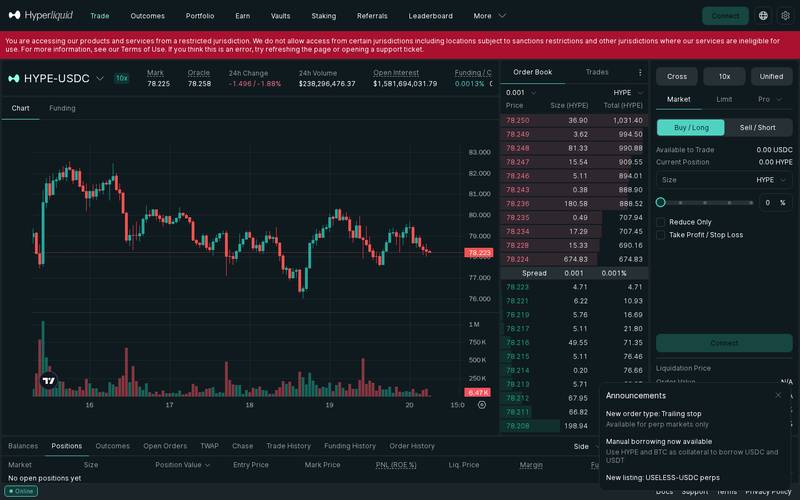
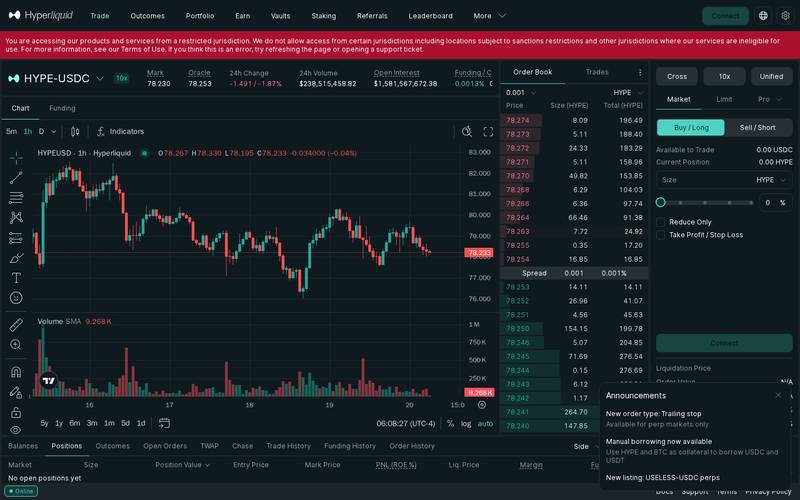
The full trading interface on desktop, showing the price chart in the centre, the order book on the right, and the order entry panel below the chart. The layout closely resembles a professional trading terminal.
Best for: Placing trades, reading the order book in detail, and monitoring multiple markets simultaneously. The desktop view gives you the most information at once without scrolling.
On a Tablet (iPad, 1024px wide)
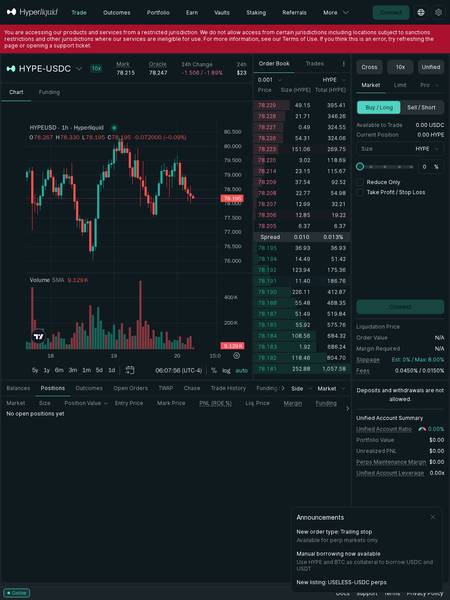
The tablet view condenses the layout slightly but keeps the chart and order entry panel visible. Some order book depth may require scrolling.
Best for: Casual monitoring and placing straightforward market or limit orders while away from your desk. The tablet screen is large enough to read prices clearly.
On a Phone (iPhone 16 Pro Max, 430px wide)
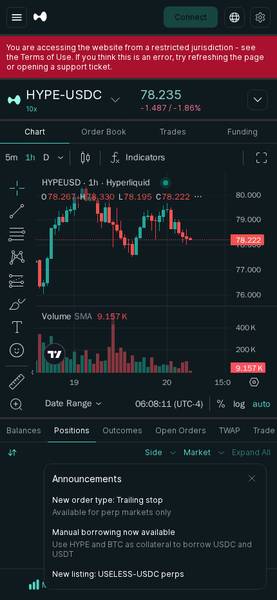
On mobile the interface stacks vertically. The chart, order entry, and positions panel each occupy their own scrollable section. Navigation tabs appear at the bottom.
Best for: Checking open positions, setting stop-loss orders, or closing a trade quickly when you are away from your computer. Opening complex new positions is easier on a larger screen.
Bottom line on devices: Hyperliquid works on all three screen sizes, but the desktop experience is clearly the primary design target. If you are new to trading, start on a desktop so you can see the full order book, funding rate, and order panel at the same time without juggling scroll positions.
Core Features
Perpetual Futures Trading (the main attraction)
Perpetual futures (perps) let you take a position on whether a price will rise or fall without owning the underlying asset. You deposit collateral (USDC or USDT), choose a leverage multiplier, and open a long (betting the price goes up) or short (betting the price goes down) position.
Leverage means you can control a position worth more than your deposit. With 10x leverage, $100 of collateral controls a $1,000 position. This multiplies both gains and losses, so if the price moves 10% against you, your entire collateral could be liquidated (wiped out). Always treat leverage with caution.
Hyperliquid supports market orders (execute immediately at the current price), limit orders (only execute if the price reaches a level you set), and a Pro mode for advanced order types. A trailing stop order, which automatically follows the price upward and triggers only if the price reverses by a set amount, was recently added for perp markets.
Spot Trading
In addition to perps, Hyperliquid offers spot markets where you buy and sell actual tokens. For example, you can buy HYPE tokens directly rather than just speculating on the price.
Unified Account with Borrowing
Hyperliquid now offers a unified account structure where your collateral, perps positions, and spot holdings are managed together. You can use HYPE and BTC as collateral to borrow USDC or USDT directly within the platform, without going to a separate lending protocol. This is similar to using your investment portfolio as security for a short-term loan.
Funding Rates
Because perpetual contracts never expire, the platform uses a funding rate to keep the contract price anchored to the real market price. If more traders are long than short, longs pay shorts a small fee every few hours. If more are short than long, the reverse happens. At the time of writing, the HYPE-USDC funding rate is 0.0013% per funding interval. This is a small cost if you hold positions overnight, and it can work in your favour if you are on the paid side.
Fully Onchain and Non-Custodial
This is the feature that sets Hyperliquid apart from centralised exchanges like Binance or Coinbase. Your funds sit in your own wallet. Hyperliquid never takes custody. The matching engine and order book run on the Hyperliquid L1 blockchain, so every trade is verifiable on a public ledger. There is no company that can freeze your account, go bankrupt with your money, or block a withdrawal (though jurisdiction restrictions at the application layer still apply).
TWAP and Chase Orders
Advanced order tools include TWAP (Time Weighted Average Price), which splits a large order into smaller pieces over time to avoid moving the market price with one big trade, and Chase orders, which automatically follow the best available price as the order book changes.
Fee Schedule
Hyperliquid uses a maker-taker fee model. "Maker" means you add liquidity to the order book by placing a limit order that is not immediately filled. "Taker" means you remove liquidity by placing a market order or a limit order that fills immediately.
| Fee Type | Rate | Notes |
|---|---|---|
| Taker fee | 0.0450% | Applies when your order fills immediately against the book |
| Maker fee | 0.0150% | Applies when your limit order rests on the book and gets filled later |
| Deposit fee | N/A (check docs) | Check current docs for bridging costs from external chains |
| Withdrawal fee | N/A (check docs) | Check current docs for withdrawal costs |
| Borrowing rate | N/A (check docs) | Variable rate for manual borrowing against HYPE and BTC collateral |
| Liquidation fee | N/A (check docs) | Applied when a position is forcibly closed due to insufficient margin |
To put the trading fees in perspective: on a $10,000 trade as a taker you would pay $4.50 in fees. As a maker you would pay $1.50. These rates are competitive compared to most centralised exchanges, which typically charge 0.05% to 0.10% per side.
Step-by-Step Tutorial
Step 1: Open Hyperliquid and Connect Your Wallet
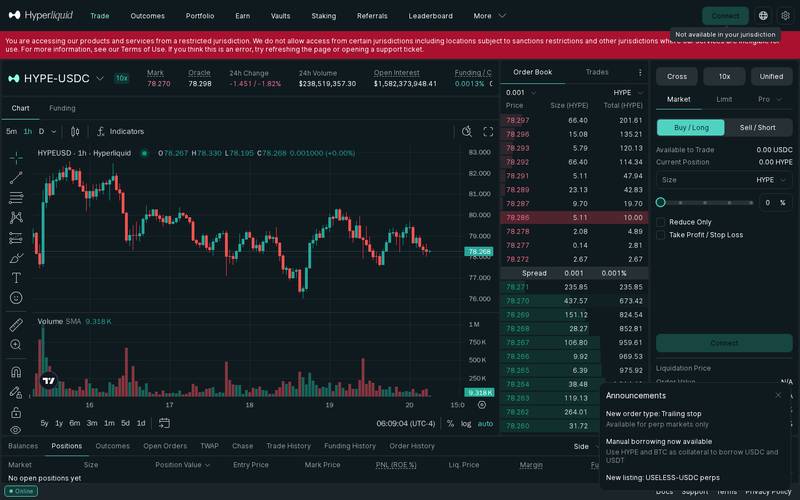
Go to https://app.hyperliquid.xyz/trade and click the "Connect" button, located in the top-right corner of the screen.
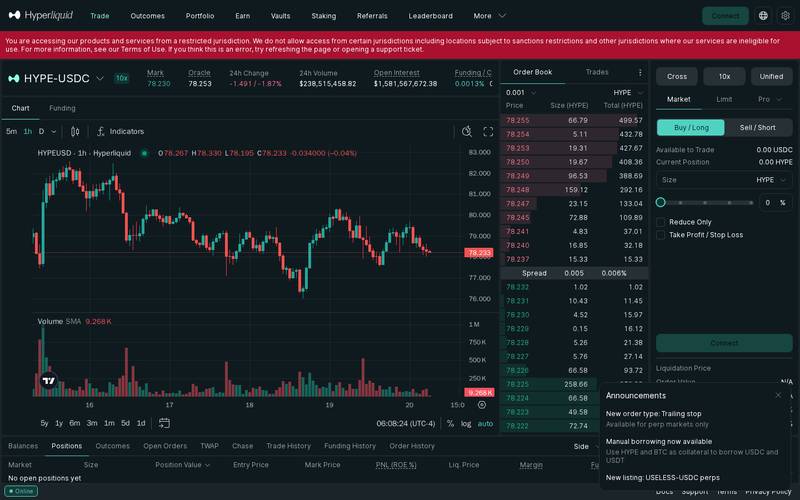
Choose your wallet from the list. MetaMask, WalletConnect, Coinbase Wallet, and others are supported.
Before connecting, make sure you are not located in a restricted jurisdiction. The platform will display a warning if it detects a restricted location. If you believe this is an error, the platform recommends refreshing or opening a support ticket. Also confirm you are on the correct URL to avoid phishing sites (fake websites designed to steal your wallet credentials).
Step 2: Deposit Funds into Your Hyperliquid Account
Before you can trade, you need to move funds from your external wallet into your Hyperliquid trading account. This is sometimes called "bridging" or "depositing."
From the main trading screen, locate the Balances tab at the bottom panel. Click Deposit. You will be prompted to choose the amount of USDC (or another supported asset) you want to move from your connected wallet into your Hyperliquid account. Confirm the transaction in your wallet pop-up.
Once deposited, your available balance will appear in the Available to Trade field on the order entry panel on the left side of the screen. Deposits and withdrawals require on-chain transactions, so you will need a small amount of the network's native gas token in your wallet to cover the transaction fee.
Step 3: Select a Market and Place Your First Trade
At the top of the screen you will see the currently selected market, for example HYPE-USDC. To browse other markets, click the market name and a dropdown list of all 300+ available perp and spot pairs will appear. Type the name of the asset you want in the search bar to filter quickly.
Once you have selected a market, look at the order entry panel. You will see three tabs: Market, Limit, and Pro.
For your first trade, select Market. This fills your order immediately at the best available price.
Choose whether you want to go Buy / Long (you think the price will rise) or Sell / Short (you think the price will fall).
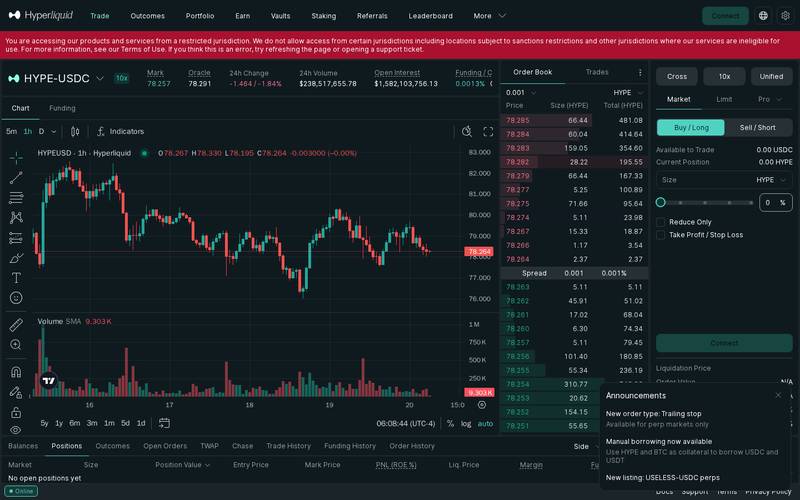
Enter a size in the Size field. You can type a number of tokens or use the percentage buttons to allocate a portion of your available balance. The panel will show you the estimated Order Value and Margin Required (the collateral locked for this trade), the Liquidation Price (the price at which your position would be automatically closed to prevent your loss exceeding your deposit), and the estimated fees.
Key fields to check before confirming:
| Field | What It Means |
|---|---|
| Mark Price | The fair value price used to calculate your profit, loss, and liquidation, based on a blend of exchange prices |
| Liquidation Price | If the market reaches this price, your position is closed automatically and you lose your margin. Keep this in mind before sizing a trade |
| Funding / Countdown | The current funding rate and the time until the next funding payment is exchanged between longs and shorts |
| Slippage | How much the execution price may differ from the quoted price. Hyperliquid shows estimated and maximum slippage. For HYPE-USDC the max is set at 8.00% by default |
| Fees | Taker 0.0450%, maker 0.0150%. Shown before you confirm |
Click Buy / Long or Sell / Short to submit. Your open position will appear in the Positions tab at the bottom of the screen.
Step 4: Set a Take Profit or Stop Loss (Optional but Recommended)
Once your position is open, it is good practice to set a Take Profit (the price at which you want to automatically close your trade to lock in a gain) and a Stop Loss (the price at which you want to automatically exit to limit a loss). This means you do not have to watch the screen around the clock.
In the order entry panel, before placing the trade, you will see a Take Profit / Stop Loss toggle. Enable it and enter your target prices. You can also use the new Trailing Stop order type for perp markets, which moves your stop-loss level up automatically as the price rises in your favour.
Alternatively, after the position is open, right-click or use the action menu next to your position in the Positions tab to add or modify these orders.
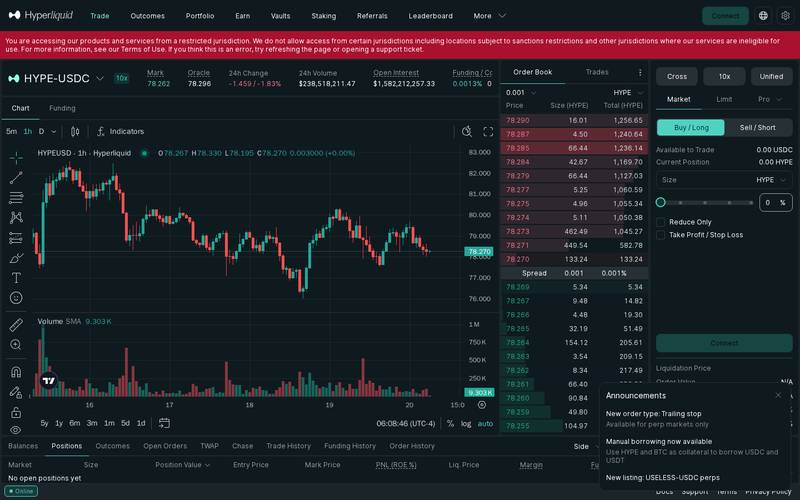
Setting these levels is especially important when using leverage. A 10x leveraged position can be liquidated by a 10% adverse price move. A stop loss set above the liquidation price gives you a controlled exit before the worst case scenario.
How to Use a Referral Link
What Is a Referral Link?
A referral link is a special web address that contains a unique code identifying who sent you to the platform. When you sign up or connect your wallet through that link, the platform records the relationship. If the platform has a referral programme, the person who referred you may earn a share of the fees your trades generate, and you may receive a fee discount.
Think of it like a tip jar: When a friend recommends a restaurant and gives you a loyalty card to hand in when you pay, the restaurant knows your friend sent you. The friend might get a credit on their next meal and you might get a discount. The referral link works the same way, automatically and on-chain.
How to Use Someone Else's Referral Link
When someone shares a referral link with you, here is what happens step by step:
Step 1: Open the link
Click the link your friend or influencer shared. It will open Hyperliquid with a special code in the URL that tells the platform who referred you.
On desktop:

On mobile:

Step 2: Connect your wallet
Connect exactly as described in the tutorial above.

Step 3: Review the trade
Once connected, the referral code is stored. Any trades you place will be tracked under your referrer's account. You do not need to do anything special for each individual trade. The link only needs to be used once when you first connect.
Step 4: The Optional Tip
Some referral programmes offer a fee discount to the referred user. Whether Hyperliquid currently offers a discount to referred users is N/A (check the official docs or the referral section inside the platform after connecting, as programme terms can change).
Step 5: Confirm in Your Wallet
After reviewing everything, click the confirm button. Your wallet shows a final confirmation with the exact amounts and the network gas fee. Approve and the transaction executes in seconds.
How to Create Your Own Referral Link
The specifics of Hyperliquid's referral programme, including how to generate your own link, what commission rates apply, and whether there are volume thresholds, are N/A (check docs) based on the research available at time of writing. To find this:
- Connect your wallet at https://app.hyperliquid.xyz/trade
- Look for a "Referral" or "Earn" section in the navigation menu or your account settings panel
- If a programme is available, the platform will display your unique referral link and your current earnings
- Copy the link and share it via social media, a website, or directly with friends
Check the official documentation at hyperliquid.xyz for current programme terms before promoting your link publicly.
For Hyperliquid Influencers and Affiliates
If you run a trading community, YouTube channel, newsletter, or social media account focused on DeFi (decentralised finance), Hyperliquid's volume numbers suggest there is real earning potential in a referral arrangement.
To put this in context: the HYPE-USDC pair alone recorded $241 million in 24-hour volume at the time of writing. If an affiliate earns even a fraction of the taker fee (0.0450%) on referred volume, the numbers can add up quickly. At 10% of the taker fee on $1 million of referred monthly volume, that would be roughly $450 per month from a single referred trader who trades actively.
However, the exact commission structure, payment method, minimum payout thresholds, and whether a formal affiliate programme exists are N/A (check docs). Reach out to the Hyperliquid team via their official support channels before building a content strategy around specific commission numbers.
Key points any affiliate should confirm before promoting:
- Commission rate per referred trade
- Whether commissions are paid in USDC, HYPE, or another token
- Minimum withdrawal threshold for affiliate earnings
- Cookie or attribution window (how long after clicking the link does a new user count as your referral)
- Restricted jurisdiction rules, since you should not promote the platform to users in locations where it is unavailable
Security: What You Need to Know
Hyperliquid is a non-custodial platform, which means the platform never holds your funds the way a bank or a centralised exchange does. This is a significant security advantage: even if the Hyperliquid company were to shut down tomorrow, you would still control your private keys (the password that proves ownership of your wallet) and therefore your funds.
The order matching and settlement happen on the Hyperliquid L1 blockchain, meaning every trade is recorded on a public, verifiable ledger. There is no single company server that can be hacked to steal user funds in the way that centralised exchange hacks (such as the Mt. Gox or FTX collapses) occurred.
That said, smart contract risk exists on any DeFi platform. A smart contract is a self-executing piece of code that lives on the blockchain. If there is a bug in that code, an attacker could potentially exploit it. No specific security audits or hack history for Hyperliquid are available in the research data, so check the official docs and audit reports before depositing large amounts.
Jurisdiction restrictions are enforced at the application layer. Users in restricted jurisdictions see a warning message and cannot access the product. This is a compliance measure rather than a security feature, but it is worth knowing.
Best practices:
- Never share your wallet seed phrase (the 12 or 24 word recovery phrase) with anyone, including people claiming to be Hyperliquid support
- Use a hardware wallet (a physical device like a Ledger or Trezor) for large balances, connecting it via WalletConnect
- Double-check the URL every time you visit: the correct address is https://app.hyperliquid.xyz/trade
- Start with a small deposit to learn the interface before committing significant capital
- Set stop-loss orders on all leveraged positions to limit downside
- Enable any two-factor authentication options available in your account settings
- Do not trade with money you cannot afford to lose, especially when using leverage
Hyperliquid vs Competitors
| Feature | Hyperliquid | dYdX | GMX | Binance (centralised) |
|---|---|---|---|---|
| Custody model | Non-custodial | Non-custodial | Non-custodial | Custodial |
| Number of markets | 300+ | N/A (check docs) | N/A (check docs) | 350+ |
| Taker fee | 0.0450% | N/A (check docs) | N/A (check docs) | 0.10% (standard) |
| Maker fee | 0.0150% | N/A (check docs) | N/A (check docs) | 0.10% (standard) |
| Leverage available | Up to 10x (HYPE-USDC) | N/A (check docs) | N/A (check docs) | Up to 125x |
| Native blockchain | Yes (Hyperliquid L1) | No (uses StarkEx) | No (uses Arbitrum) | No (centralised) |
| Spot trading | Yes | No | Limited | Yes |
| Trailing stop orders | Yes (perps) | N/A (check docs) | N/A (check docs) | Yes |
| Manual borrowing | Yes (HYPE, BTC collateral) | No | No | Yes (separate product) |
| KYC required | No (wallet-based) | No | No | Yes |
Note: competitor data outside the research scope is marked N/A (check docs). Verify current competitor fees and features directly before making decisions based on this table.
Verdict
Who Hyperliquid is for:
- Experienced crypto traders who want the fee transparency and self-custody of a decentralised exchange without sacrificing the speed and depth of a professional order book
- Traders who want access to a large range of perpetual markets (300+) in one place
- Users who value being able to verify every trade on a public blockchain
- Anyone who has been burned by centralised exchange collapses and wants to keep control of their funds
- Traders who use advanced order types like trailing stops and TWAP
Who should look elsewhere:
- Complete beginners who have never owned cryptocurrency before. The leveraged perpetuals interface is complex and mistakes with leverage can wipe out your deposit quickly. Learn the basics on a simpler spot exchange first.
- Users in restricted jurisdictions, as the platform actively blocks access from sanctioned and ineligible locations
- Anyone looking for a simple token swap experience. Hyperliquid is a trading terminal, not a basic swap interface. For straightforward swapping, products like Uniswap may feel more approachable.
- Traders who need very high leverage (above 10x on the markets reviewed). Some centralised exchanges offer higher leverage, though higher leverage also means higher risk.
Rating: 4.3 / 5
Hyperliquid stands out in the decentralised exchange space by combining genuine non-custodial security with a trading experience that rivals centralised platforms. The fee structure is transparent and competitive, the market selection is broad, and features like trailing stops and manual borrowing show that the team continues to develop the product. The main caveats are the steep learning curve for newcomers, the complexity of leveraged trading, and the limited publicly available information about the referral programme and security audits in the research available. For traders who know what they are doing and want to keep their funds off a centralised platform, Hyperliquid is one of the most compelling options available in 2026.
Quick Links
- Main trading app: https://app.hyperliquid.xyz/trade
- Official documentation: https://hyperliquid.xyz (check for the docs link on the main site)
- Support: accessible via the Support link in the footer of the trading app
- Terms of Use: accessible via the Terms link in the footer
- Privacy Policy: accessible via the Privacy Policy link in the footer
Last verified: October 20, 2026. Screenshots taken live from https://app.hyperliquid.xyz/trade.
Defiliban · Ada Michael

Ada Michael
@ada-michael