KyberSwap Review 2026: Complete Beginner's Guide
Who this guide is for: Anyone who has heard of swapping crypto tokens but finds most DeFi (decentralized finance) tutorials confusing. This guide assumes you have never used a decentralized exchange before.


KyberSwap Review 2026: Complete Beginner's Guide
Who this guide is for: Anyone who has heard of swapping crypto tokens but finds most DeFi (decentralized finance) tutorials confusing. This guide assumes you have never used a decentralized exchange before. We explain every term the first time it appears.
We tested this on three real devices (screenshots throughout are taken live, not stock photos):
- Desktop – 1440px wide screen (Windows laptop or iMac)
- Tablet – iPad at 1024px
- Phone – iPhone 16 Pro Max at 430px
What Is KyberSwap? (Plain English)
Imagine you want to exchange US dollars for euros. You could walk into the first currency booth you find, but a smart traveller checks several booths and picks the one offering the best rate. KyberSwap does exactly that, but for crypto tokens, and it checks hundreds of sources in milliseconds.
KyberSwap is a decentralized exchange aggregator (a tool that searches many trading venues at once so you do not have to). Unlike a centralized exchange such as Coinbase or Binance, KyberSwap is non-custodial, meaning it never holds your money. You stay in control of your wallet at all times, and trades happen directly on the blockchain (a public, tamper-proof record book shared across thousands of computers).
In plain terms: KyberSwap is a smart token-swapping tool that hunts for the best price across hundreds of crypto marketplaces and routes your trade through whichever combination gives you the most tokens back.
Who built it? KyberSwap is developed within the Kyber Network Ecosystem, one of the pioneering names in decentralized finance. Kyber Network has been building on-chain liquidity infrastructure since the early days of Ethereum. The platform has grown into a multi-chain product serving retail traders, developers building their own apps on top of KyberSwap's APIs, and now even AI agents that can interact with its trading infrastructure automatically.
Key facts (October 20, 2026):
- Connected to over 420 liquidity sources (places where tokens are available to trade)
- Available across 19 blockchain networks (Ethereum, Polygon, BNB Chain, Arbitrum, and more)
- Over US $170 billion in total transactions processed
- More than 4.8 million users served
- Ranked number 1 on EVM (Ethereum Virtual Machine) networks by trading volume
- Non-custodial: you keep control of your tokens at all times
- No account or sign-up required to use the interface
- Supports Swap, Limit Orders, and Cross-chain Swaps
- Includes Kyber Earn, a hub for liquidity provision and yield opportunities
How KyberSwap Looks on Your Device
We opened KyberSwap on three different screen sizes and took real screenshots so you know exactly what to expect before you visit.
On a Laptop or Desktop Computer (1440px wide)
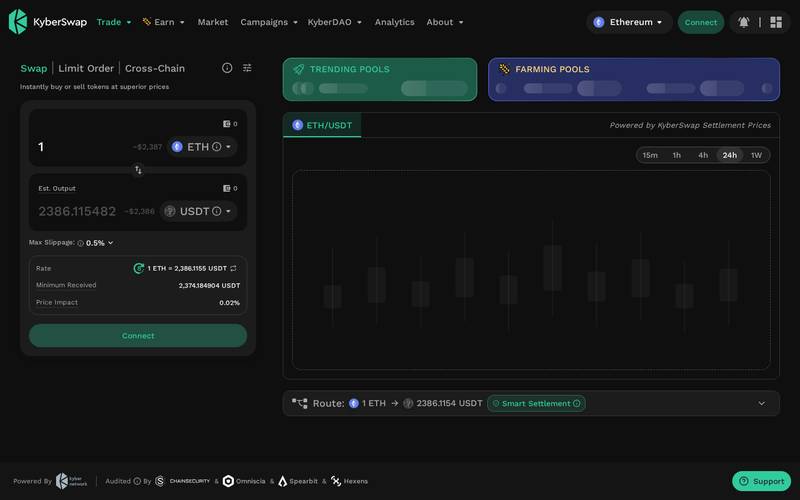
The full KyberSwap desktop interface showing the swap panel in the centre, trending pools on the right, and the navigation bar at the top. Everything is visible without scrolling.
Best for: First-time users who want to see all information at once, traders placing limit orders or cross-chain swaps, and anyone who wants to compare the rate details carefully before confirming.
On a Tablet (iPad, 1024px wide)
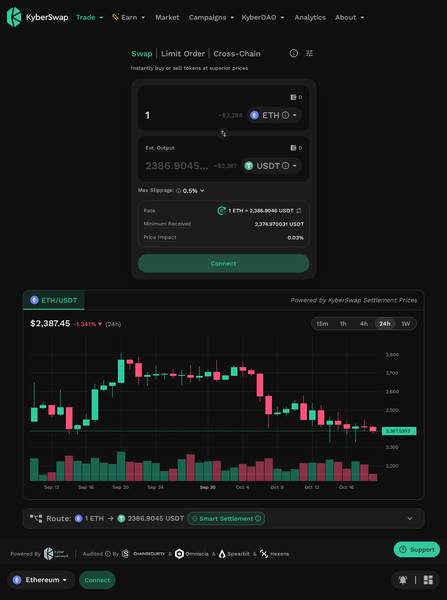
The tablet view keeps the swap panel prominent. Navigation collapses slightly but all core functions remain accessible without needing the desktop layout.
Best for: Casual users who prefer a larger touchscreen than a phone but do not want to sit at a desk. Good for browsing farming pools and checking rates while relaxed.
On a Phone (iPhone 16 Pro Max, 430px wide)
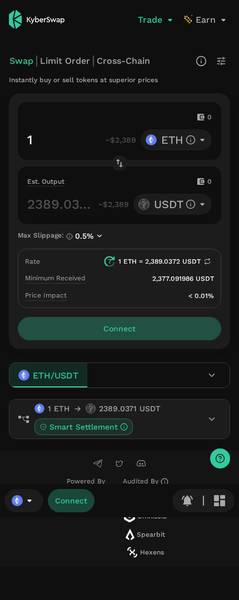
The mobile view stacks the swap inputs vertically. The confirm button is easy to tap and the slippage (the acceptable difference between the quoted price and the final price) setting is accessible via a small gear icon.
Best for: Quick swaps on the go when you already know what tokens you want to exchange. Not ideal for first-time users learning the interface, as some detail panels require scrolling.
Bottom line on devices: KyberSwap works well on all three sizes. Desktop is easiest for learning. Mobile is fine for quick, routine swaps once you are comfortable.
Core Features
KyberSwap packages several tools under one roof. Here is what each one does and why it matters.
1. Swap (Token Exchange)
This is the main feature most users start with. You pick a token you own, pick the token you want, enter the amount, and KyberSwap's aggregator engine automatically finds the best route across 420+ liquidity sources. It can split your trade across multiple sources simultaneously if doing so gets you a better overall price. The default slippage tolerance (the maximum price shift you will accept before the transaction cancels automatically) is set to 0.5%, which is a sensible starting point.
2. Limit Orders
A standard swap executes immediately at the current market price. A limit order lets you set a target price and the trade only executes when the market reaches that price. Think of it like leaving a standing order with a currency booth: "Exchange my dollars for euros only when the rate reaches X." No gas fee (the small processing fee paid to the blockchain network) is charged until the order actually fills.
3. Cross-Chain Swaps
Most exchanges only let you trade tokens on the same blockchain network. A cross-chain swap lets you send a token on one network and receive a different token on a completely different network in one step. For example, you could swap Ethereum-based USDC for a token that lives on the BNB Chain without manually bridging (transferring tokens between networks) yourself.
4. Kyber Earn
This is the liquidity provision and yield section. Liquidity provision means depositing two tokens into a trading pool so that other users can swap between them. In return, you earn a share of the trading fees those swappers pay. Kyber Earn also displays farming pools, where additional token rewards are distributed on top of trading fees. This section is more advanced and is best explored after you are comfortable with basic swaps.
5. Public APIs and AI Agent Hub
For developers and builders, KyberSwap offers open APIs (programming interfaces that let other apps plug into KyberSwap's price data and routing) and an MCP server for AI agents. These are technical tools beyond the scope of this beginner guide, but they explain why hundreds of other DeFi projects have been built on top of KyberSwap's infrastructure.
Fee Schedule
KyberSwap's fee structure has a few components. The research material does not publish a single flat fee table, so the table below reflects what is documented and what is standard for this type of platform.
| Fee Type | Amount | Who Pays It | Notes |
|---|---|---|---|
| Swap fee (aggregator routes) | N/A (check docs) | Trader | Embedded in the swap rate. KyberSwap sources liquidity from external pools, each with their own fee tier |
| Limit order execution fee | N/A (check docs) | Trader | Only charged when the order actually fills |
| Cross-chain swap fee | N/A (check docs) | Trader | Varies by route and bridge used |
| Network gas fee | Varies, roughly $0.50 to $5+ | Trader | Paid to the blockchain, not to KyberSwap. Lower on chains like Polygon, higher on Ethereum mainnet |
| Liquidity provision fee share | Varies by pool | Earned by liquidity providers | A portion of each swap fee goes back to depositors |
| Platform use fee | None | N/A | No account, subscription, or sign-up fee |
Important note: Because KyberSwap routes through external liquidity pools, the exact fee you pay is wrapped into the exchange rate shown. The interface displays the estimated output and minimum received amounts clearly so you can see the effective cost before confirming.
Step-by-Step Tutorial
This tutorial walks you through the most common task: swapping one token for another. By the end you will have done a real trade on-chain.
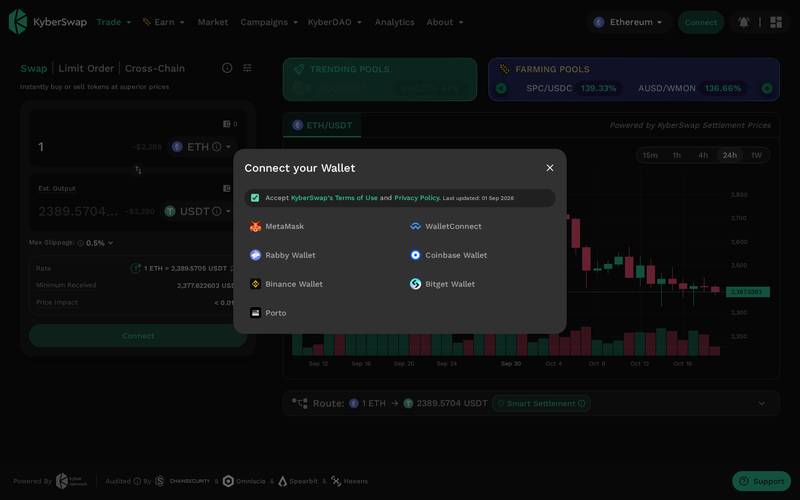
Step 1: Open KyberSwap and Connect Your Wallet
Go to kyberswap.com and click the "Connect" button (usually top-right corner).
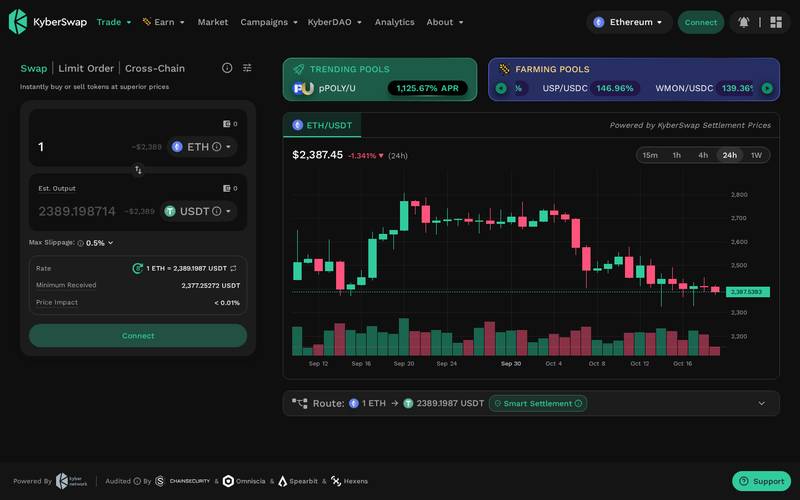
Choose your wallet from the list. MetaMask, WalletConnect, Coinbase Wallet, and others are supported.
A wallet (in this context a crypto wallet, not a physical one) is software that stores the keys to your blockchain funds. MetaMask is the most common choice for beginners on desktop. If you are on mobile, WalletConnect lets you connect a phone-based wallet by scanning a QR code. KyberSwap never asks for your seed phrase (the 12 or 24 word backup phrase). If anything ever asks for that phrase, close the window immediately.
After connecting, your wallet address (a long string of letters and numbers that acts like your account number) appears in the top-right corner. You are now ready to trade.
Step 2: Select Your Blockchain Network
KyberSwap works across 19 different blockchain networks. Before swapping, you need to make sure both your wallet and KyberSwap are set to the same network, and that this network holds the token you want to swap.
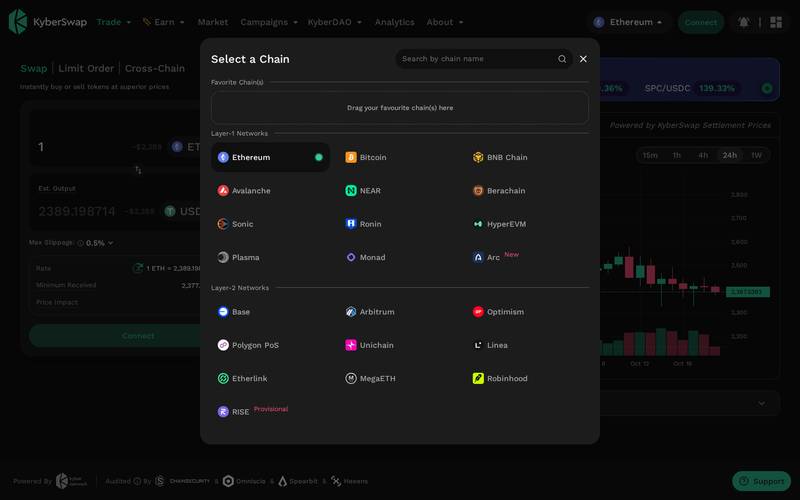
Look for the network name displayed near your wallet address or in a dropdown at the top of the interface. Common choices include Ethereum, Arbitrum, Polygon, BNB Chain, and Optimism.
To change the network:
- Click the network name or the network icon in the interface.
- Select the network where your tokens live from the dropdown list.
- Your wallet will prompt you to approve the network switch. Click "Switch Network" or "Approve" in your wallet pop-up.
If you are not sure which network to use, Ethereum is the most widely used but has higher gas fees. Polygon and Arbitrum are cheaper for smaller trades.
Step 3: Enter Your Swap Details and Confirm
Now you will set up your actual trade. The swap panel has two boxes: the top is the token you are sending, the bottom is the token you want to receive.
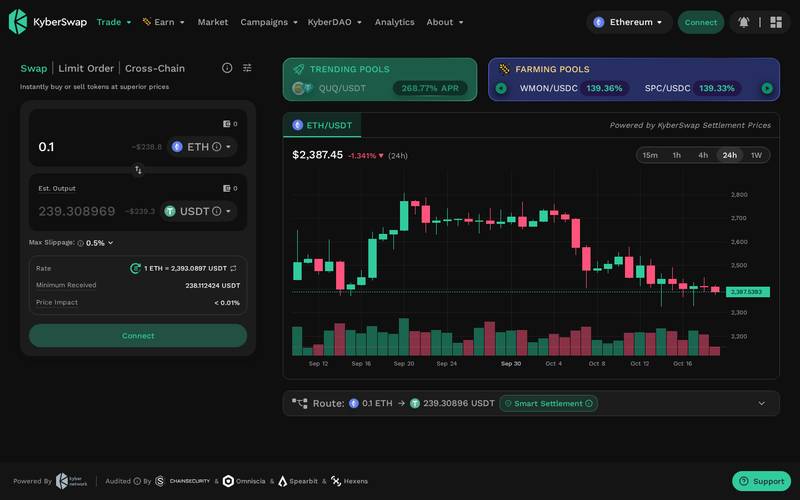
Follow these sub-steps:
- Click the token selector in the top box and choose the token you want to swap away (for example, ETH, which is the native currency of the Ethereum network).
- Type in the amount you want to swap, or click "Max" to use your entire balance.
- Click the token selector in the bottom box and choose the token you want to receive (for example, USDC, a stablecoin pegged to the US dollar).
- KyberSwap's aggregator instantly calculates the best route and fills in the estimated output amount.
- Review the details panel below the swap boxes before clicking anything.
Key fields to check before confirming:
| Field | What It Means |
|---|---|
| Rate | How many output tokens you get per input token right now |
| Minimum Received | The worst case you will accept. If the rate drops below this during the transaction it cancels automatically |
| Price Impact | How much your trade moves the market price. Under 1% is fine. Over 5% be careful |
Once you are satisfied, click the "Swap" button. Your wallet will open a confirmation window showing the exact amounts and the gas fee. Click "Confirm" in your wallet and the transaction is submitted to the blockchain. It typically completes within seconds to a minute depending on network congestion.
Step 4: Place a Limit Order (Optional)
If you are not happy with the current price and want to wait for a better rate, use the Limit Order tab instead of the Swap tab.
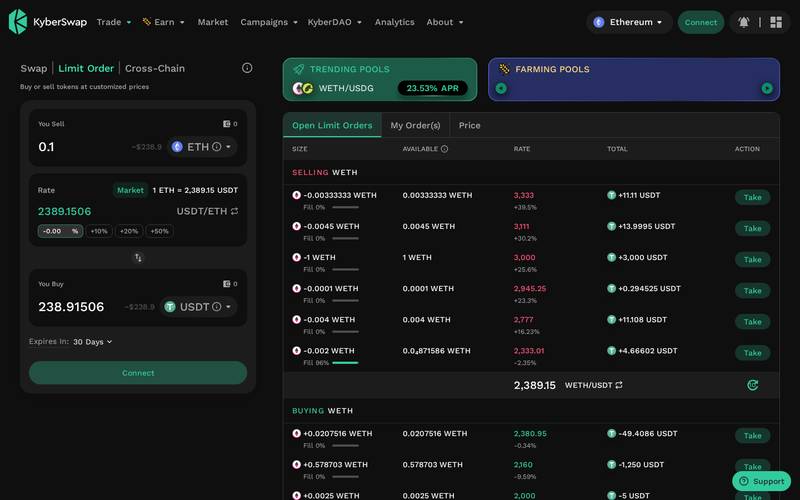
Here is how to set one up:
- Click the "Limit" tab at the top of the swap panel.
- Select your input token and output token as before.
- Enter the amount you want to swap.
- In the "Rate" or "Price" field, type the exchange rate you want. For example, if ETH is currently $2,400 and you want to wait until it hits $2,600, set your rate to reflect that.
- Choose an expiry (how long the order stays open: for example, 1 day, 7 days, or 30 days). After this time the order cancels automatically if it has not been filled.
- Click "Review Order", then approve the signature request in your wallet (this is a free action, no gas fee yet).
- Your order is now live. You can view and cancel it from the "My Orders" section below the swap panel.
The order fills automatically when the market hits your target price. You do not need to be online when it happens.
How to Use a Referral Link
What Is a Referral Link?
A referral link is a special web address that contains a code identifying who sent you to the platform. When you use a referral link to visit KyberSwap and then make a trade, the person who shared the link may earn a small reward from the platform, at no extra cost to you.
Think of it like a tip jar: When a friend recommends a restaurant and you visit using their loyalty card number, the restaurant credits your friend. The food costs you the same. Referral links work on the same principle.
How to Use Someone Else's Referral Link
When someone shares a referral link with you, here is what happens step by step:
Step 1: Open the link
Click the link your friend or influencer shared. It will open KyberSwap with a special code in the URL (the web address) that tells the platform who referred you.
On desktop:

On mobile:

Step 2: Connect your wallet
Connect exactly as described in the tutorial above.

Step 3: Review the trade
The referral code does not change the swap rate or add any fees for you. You use KyberSwap normally. Choose your tokens, enter your amount, and review the rate, minimum received, and price impact fields as described in Step 3 of the tutorial above.
Step 4: The Optional Tip
Some DeFi referral systems include an optional tip field where you can voluntarily send a small percentage of the trade value to the referrer. If KyberSwap displays such a field, it is always optional and always shown clearly before you confirm. If you do not see a tip field, the referrer simply earns from a platform-level reward mechanism that costs you nothing.
Step 5: Confirm in Your Wallet
After reviewing everything, click the confirm button. Your wallet shows a final confirmation with the exact amounts and the network gas fee (typically $0.50 to $5 depending on the network). Approve and the transaction executes in seconds.
How to Create Your Own Referral Link
The research material does not document a specific step-by-step referral link creation flow for KyberSwap as of October 2026. Here is the general process for platforms of this type, and you should verify the current details in KyberSwap's official documentation at docs.kyberswap.com:
- Connect your wallet to kyberswap.com.
- Look for a "Referral" or "Earn" section in your account menu or the navigation bar.
- If a referral programme is active, the platform will display your unique referral link tied to your wallet address.
- Copy the link and share it via social media, a Telegram group, a YouTube video description, or any other channel.
- When someone visits KyberSwap using your link and completes a swap, your reward is credited automatically according to the programme terms.
If you cannot find a referral section, check docs.kyberswap.com or the official KyberSwap Discord or Telegram for the most current programme details, as these programmes can be updated or paused.
For KyberSwap Influencers and Affiliates
If you create content about crypto, DeFi, or trading and you have an audience, KyberSwap's scale makes it an attractive platform to promote. Consider the following points:
- Credibility: With over US $170 billion processed and 4.8 million users, KyberSwap is not a new or unproven platform. Recommending it to your audience carries less reputational risk than promoting an unknown project.
- Multi-chain reach: Because KyberSwap works across 19 chains, your audience does not need to use a specific network to benefit. Whether they are Ethereum users, BNB Chain users, or Polygon users, they can all use the same platform.
- Educational angle: The platform has genuine beginner-friendly features (clear rate display, slippage settings, limit orders) that give you plenty to explain and demonstrate in tutorials.
- API and developer angle: If your audience includes developers, the open API and AI agent hub are strong content hooks for a more technical audience.
- Programme terms: Always read the current affiliate or referral programme terms before promoting. Reward rates, eligibility, and payment methods can change. The most up-to-date terms are at docs.kyberswap.com or via the official KyberSwap team channels.
- Disclosure: In most countries, you are legally required to disclose when you earn a commission from a referral. Always tell your audience clearly when a link is a referral link.
Security: What You Need to Know
KyberSwap is a non-custodial platform, which means it does not hold your funds. Your tokens stay in your own wallet at all times, and trades are executed by smart contracts (self-executing code on the blockchain that runs automatically when conditions are met). This is fundamentally safer than a centralized exchange where you deposit funds into a company-controlled account.
However, smart contracts are code, and code can have bugs. The DeFi space has seen exploits (attacks that take advantage of software vulnerabilities) across many platforms. The research material does not document any specific past security incidents for KyberSwap, but it is worth noting that users should always verify they are on the correct URL before connecting a wallet, as phishing sites (fake copies of real platforms designed to steal your credentials) are common in crypto.
KyberSwap's aggregator connects to external liquidity pools. The security of those pools depends on the individual protocols providing them, not only on KyberSwap itself.
Best practices:
- Always type kyberswap.com directly into your browser or use a bookmark. Do not click links in emails or DMs from strangers.
- Never share your wallet seed phrase (the 12 or 24 word recovery phrase) with anyone or any website.
- Start with a small test trade before moving larger amounts.
- Use a hardware wallet (a physical device like a Ledger or Trezor that stores your keys offline) for large holdings.
- Check the transaction details carefully in your wallet pop-up before clicking confirm. Verify the token amounts and the contract address.
- If a swap route looks unusual or the price impact is over 5%, pause and investigate before proceeding.
- Keep your wallet software updated to the latest version.
KyberSwap vs Competitors
| Feature | KyberSwap | Uniswap | 1inch |
|---|---|---|---|
| Type | Aggregator plus native DEX | Native DEX (decentralized exchange) | Aggregator |
| Chains supported | 19 | N/A (check docs) | N/A (check docs) |
| Liquidity sources | 420+ | Own pools only | N/A (check docs) |
| Limit orders | Yes | Limited | Yes |
| Cross-chain swaps | Yes | No (as of writing) | Partial |
| Non-custodial | Yes | Yes | Yes |
| Account required | No | No | No |
| API access | Yes, open and permissionless | Yes | Yes |
| AI agent support | Yes (MCP server) | N/A (check docs) | N/A (check docs) |
| Total volume processed | US $170B+ | N/A (check docs) | N/A (check docs) |
Note: Competitor data for Uniswap and 1inch reflects general public knowledge and may have changed. Verify current figures on each platform's official documentation.
Verdict
Who KyberSwap is for:
- Crypto users who want the best possible swap rate without manually checking five different exchanges.
- Traders who want limit order functionality without moving to a centralized platform.
- Users who need to move tokens between different blockchain networks in a single step via cross-chain swaps.
- Liquidity providers (people who deposit tokens into trading pools to earn fees) looking for a multi-chain earning dashboard.
- Developers who want to integrate decentralized trading data or routing into their own applications via open APIs.
- Anyone who values non-custodial trading, meaning they want to keep control of their own funds at all times.
Who should look elsewhere:
- Complete beginners who have not yet set up a crypto wallet. You need a wallet before KyberSwap is useful to you. Start by setting up MetaMask or Coinbase Wallet first.
- Users who prefer a simple buy-with-card experience. KyberSwap does not let you purchase crypto with a bank card or PayPal. It is purely a token-to-token exchange tool.
- Anyone wanting to trade derivatives (futures or options contracts), as KyberSwap focuses on spot swaps (immediate token exchanges at current prices).
- Users who need customer support to resolve account disputes. Because there is no account, there is no account recovery. If you lose your wallet seed phrase, your funds are inaccessible.
Rating: 4.4 / 5
KyberSwap earns high marks for its breadth of coverage (19 chains, 420+ liquidity sources), its clean interface, and its genuinely useful feature set that goes well beyond a basic swap tool. The addition of limit orders and cross-chain swaps in one interface is a meaningful convenience advantage. The AI agent hub and open APIs show that the team is investing in the platform's future. The main limitations are shared by all non-custodial DeFi tools: no fiat on-ramp, no account recovery, and a learning curve for absolute beginners who have never used a wallet before. For anyone past that initial setup stage, KyberSwap is one of the strongest multi-chain trading interfaces available today.
Quick Links
- Main platform: https://kyberswap.com
- Official documentation: https://docs.kyberswap.com
- User guide (step-by-step tutorials): available within docs.kyberswap.com under the User Guide section
- Developer API guide: available within docs.kyberswap.com under the Developer Guide section
- AI Agent Hub resources: available within docs.kyberswap.com under the AI Agent Hub section
Last verified: October 20, 2026. Screenshots taken live from kyberswap.com.
Defiliban · Oliver Benjamin

Oliver Benjamin
@oliver-benjamin